
Sales
Qualify demand, recommend the right next step, and move opportunities toward an approved outcome.
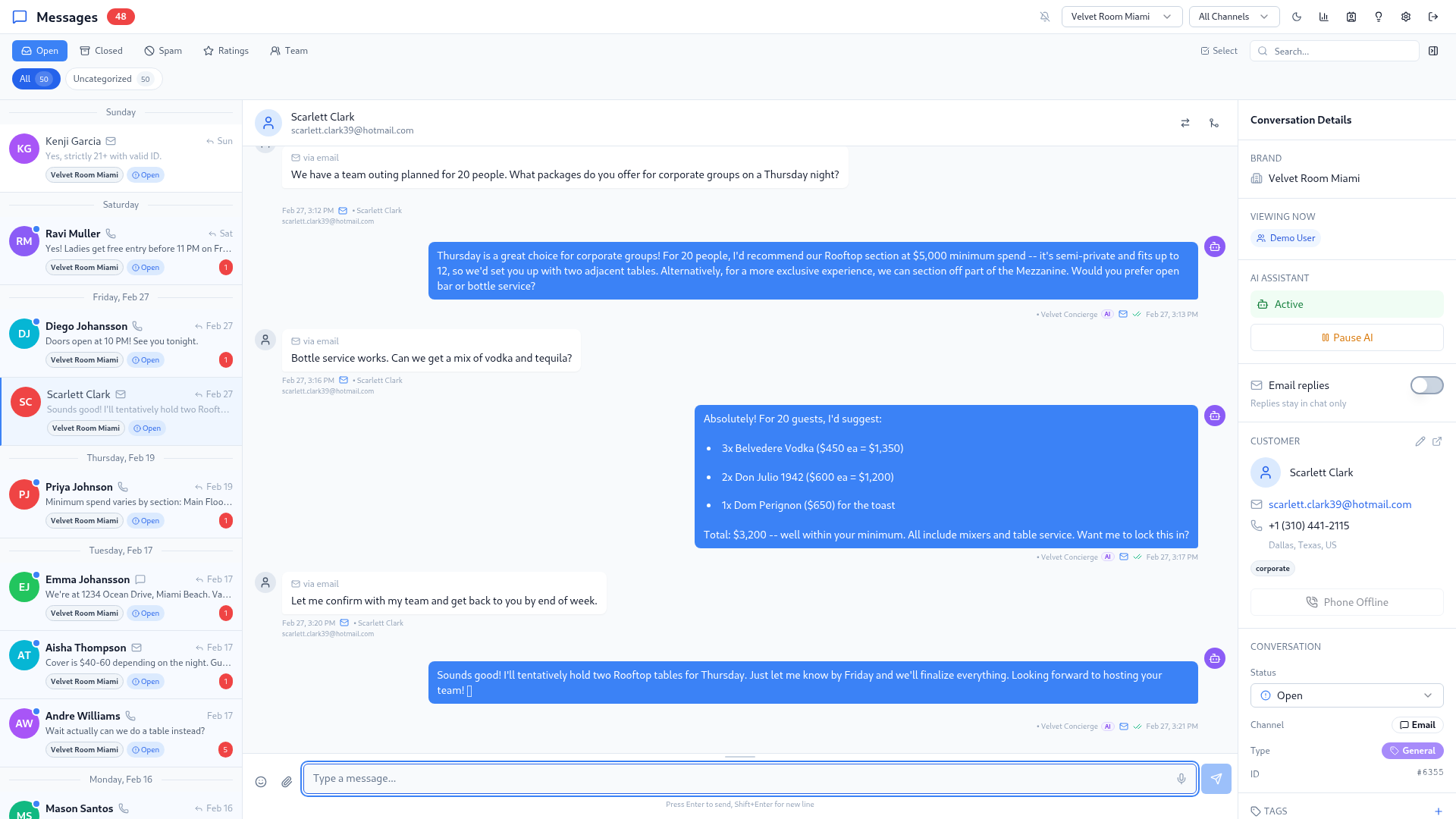
Teliance Chat helps teams generate sales, identify relevant upsell opportunities, serve guests, and resolve support requests across every connected conversation.
Understand and act
Capture the guest’s request and use approved operating details to move it forward.
Recommend in context
Present a relevant service or upgrade within the natural conversation.
Keep staff in control
Pause autonomy or take over with the guest history and next step intact.
Business outcomes
Connect commercial conversations and guest care without losing context between teams or channels.
Qualify demand, recommend the right next step, and move opportunities toward an approved outcome.
Identify relevant upgrades, add-ons, packages, and adjacent services using guest context.
Answer routine questions and complete configured requests using approved business knowledge.
Resolve common issues and escalate exceptions to staff with the conversation history intact.
Understand intent, answer from approved knowledge, complete configured actions, recommend relevant services, and escalate exceptions.
Build triggered, multi-step outreach that adapts to guest behavior and returns replies to the shared inbox.
Let employees retrieve operating information, contact guests, complete approved tasks, and draft personalized outreach.
Build useful profiles, categorize demand, measure conversion, and expose the knowledge and workflow gaps that need attention.
The connected guest journey
Teliance Chat brings sales, guest service, support, Campaigns, and staff assistance into a shared workspace.
Before the visit
01Answer questions, check availability, qualify inquiries, recommend relevant options, and advance reservations or event opportunities.
During the visit
02Handle configured requests, changes, add-ons, and operating questions while preserving the context staff need to deliver.
After the visit
03Collect feedback, support service recovery, build approved follow-up campaigns, and create relevant reasons to return.
When staff are needed
04Route exceptions and high-value opportunities to the right team with the guest history, request, and completed work intact.
Autonomous revenue concierge
The concierge can answer, qualify, configure, recommend, act, and escalate using the context and operating boundaries defined for the deployment.
Identify the request, guest context, timing, and commercial intent.
Capture party size, preferences, budget, location, or other approved requirements.
Check availability, packages, pricing, minimums, policies, and operating rules.
Present the most relevant upgrade, add-on, adjacent offering, or next-best option.
Complete an approved booking, hold, payment-link, confirmation, routing, or follow-up step.
Transfer exceptions and high-value opportunities with the full history and completed work intact.
Campaign automation
Build proactive sequences that respond to guest behavior, preserve consent and frequency rules, and turn every reply into a live conversation with context intact.
Campaign sequence
ActiveTrigger
Guest visits, books, subscribes, or enters an approved audience
Day 1 · Email
Personalized announcement or follow-up
Day 3 · SMS
Relevant reminder based on engagement
Day 5 · Message
Final configured step with a clear next action
Coordinate email, SMS, and supported messaging steps within one campaign flow.
Change the next step when a guest opens, clicks, replies, converts, or remains inactive.
Route responses into the shared inbox so AI or staff can continue with context.
Stop sequences when a guest books, replies, converts, unsubscribes, or meets another configured condition.
Use approved timing, frequency caps, testing, suppression, and bounce protection.
Measure enrollment, delivery, engagement, responses, exits, and attributable outcomes by step.
Let a guest move from campaign email into a live conversation with the prior context intact.
Capture interest in an event, opening, availability change, or announcement and follow up when it occurs.
Staff AI Assistant
Available
Representative workflow. Organization, guest, request, and actions are fictional.
Staff AI assistant
Staff can ask for information or request an approved action in natural language without reconstructing the guest history or navigating every underlying workflow manually.
Create, modify, or cancel configured requests and bookings from a natural-language staff instruction.
Send approved email, SMS, or supported messages on behalf of a staff member.
Look up approved hours, menus, events, policies, pricing, availability, and guest context.
Prepare follow-ups, campaign content, guest responses, and relevant offers for review or delivery.
Guest intelligence and sales operations
Capture useful guest history, categorize demand, build audiences using consent and permissions, and connect conversations to measurable outcomes.
Guest profile
EnrichedJordan Lee
Returning guest · Fictional profile
History
12 conversations
Interest
Private events
Status
Qualified
AI insights
Review queueKnowledge gaps
Questions grouped for review
Contradictions
Conflicting content surfaced
Handoffs
Reasons and ownership visible
Content health
Freshness and workflow status
Unify contact details, preferences, notes, tags, engagement, and conversation history.
Classify inquiries with confidence scoring and route custom categories to the right team.
Preserve conversations and configured booking, spend, browsing, and campaign activity in context.
Build audiences using location, engagement, history, consent, value, or custom tags.
Connect channels and conversations to conversion funnels, campaign performance, and approved commercial outcomes.
Support guest and staff workflows across a broad range of languages and channels.
Move an opportunity to another approved location or brand while preserving the request and guest context.
Record guest interest and initiate approved follow-up when relevant information becomes available.
AI governance and insights
Autonomy remains bounded by approved knowledge, actions, roles, escalation conditions, and operating controls.
Detect when the request needs judgment or falls outside approved autonomy.
Identify recurring questions the concierge cannot answer confidently.
Surface conflicting business information before it becomes a guest-facing problem.
Pause autonomy and let staff continue with the complete conversation and guest context.
Monitor configured workflow success and the freshness of approved knowledge sources.
Set operating limits around AI usage and review performance against business priorities.
Platform analytics
Review conversation demand, response performance, AI quality, guest satisfaction, audience behavior, campaign funnels, attributable outcomes, handoffs, and content health.
Volume, response time, peak hours, and staff performance
Quality, tool use, latency, and guest satisfaction
Geography, categories, sources, and campaign attribution
Funnels, outcomes, revenue by channel, and top events
Enrollment, delivery, engagement, replies, exits, and conversion
Complete platform
Capabilities are configured around the channels, data, permissions, operating rules, and approved actions included in each deployment.
Frequently asked questions
Yes. Teliance Chat supports proactive, multi-step guest engagement with configured channels, branching, reply handling, exit rules, and campaign reporting.
The assistant helps authorized staff retrieve operating information, complete configured tasks, contact guests, and draft personalized responses, follow-ups, campaigns, and offers.
Yes. Guest replies can return to the shared inbox with campaign and guest context intact, where configured AI or staff workflows can continue the interaction.
No. Teliance Chat can operate across supported digital channels. Voice AI includes Teliance Chat and can connect to Teliance Hosted PBX or an approved existing voice environment.
No. Hospitality is the current core focus, but the platform supports other customer-facing operations with repeatable sales, service, campaign, and staff workflows.
Connected voice
Teliance Voice AI includes the complete Chat platform for transcripts, digital continuation, guest context, campaigns, and staff collaboration.
Talk with our team
See how the autonomous concierge, Campaigns, Staff AI Assistant, and guest intelligence work together around your guest journeys, channels, and operating controls.